
补丁类型:游戏MOD
整理时间:2025-08-01
大小:22.26MB
补丁语言:简中
版本:1.00
补丁特点:
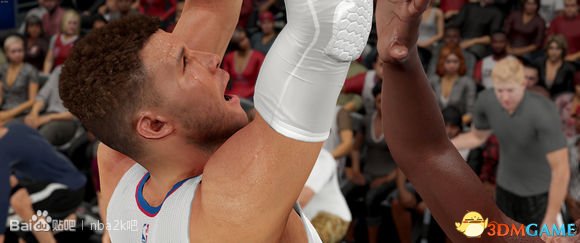
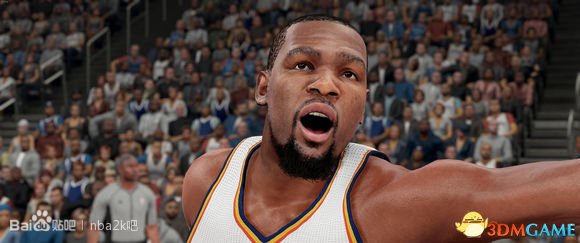
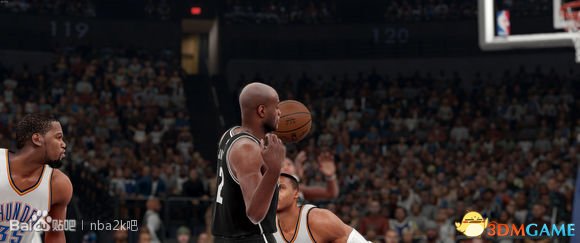
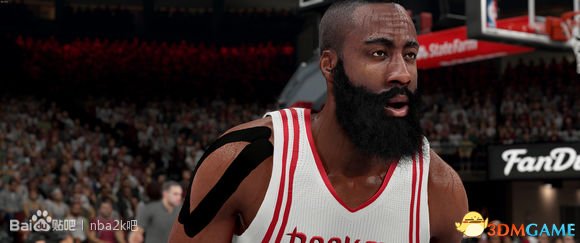
– Rremoves yellowish tint
– Adjusts lighting to create a more realistic halogen/stadium feel and accentuate reflections
– Slightly sharpen the picture
– Slightly brighten the picture
使用方法:
1) 下载”Reshade Framework 1.0.0″
2) 解压到任何文件夹
3) 下载ReShade画面增强补丁1.0
4) 把画面增强补丁 “ReShade” 文件夹替换Reshade Framework 的 “ReShade” 文件夹
5) 点击 “mediator.exe” 运行Reshade Framework
6) 点击 “Add” 选择”NBA2K16.exe”
7) 确保选择Direct3D 10/11 (默认Direct 3D 9)
8) 点击 “Confirm”
9) 在空白的下拉框选择 “goldenstate77” (or one of my 2K15 presets–“additional color”, “broadcast”, or “lighting overhaul”
10) 点击 “Apply”
11) 关闭Mediator, 运行游戏
使用说明:https://www.3dmgame.com/faq/201607/3580131.html
补丁预览:

攻略大全
下载地址
https://dl1.shwswl.cn/NBA2K/NBA2K16/1/3DMGAME-NBA2K16-ReShade.7z
